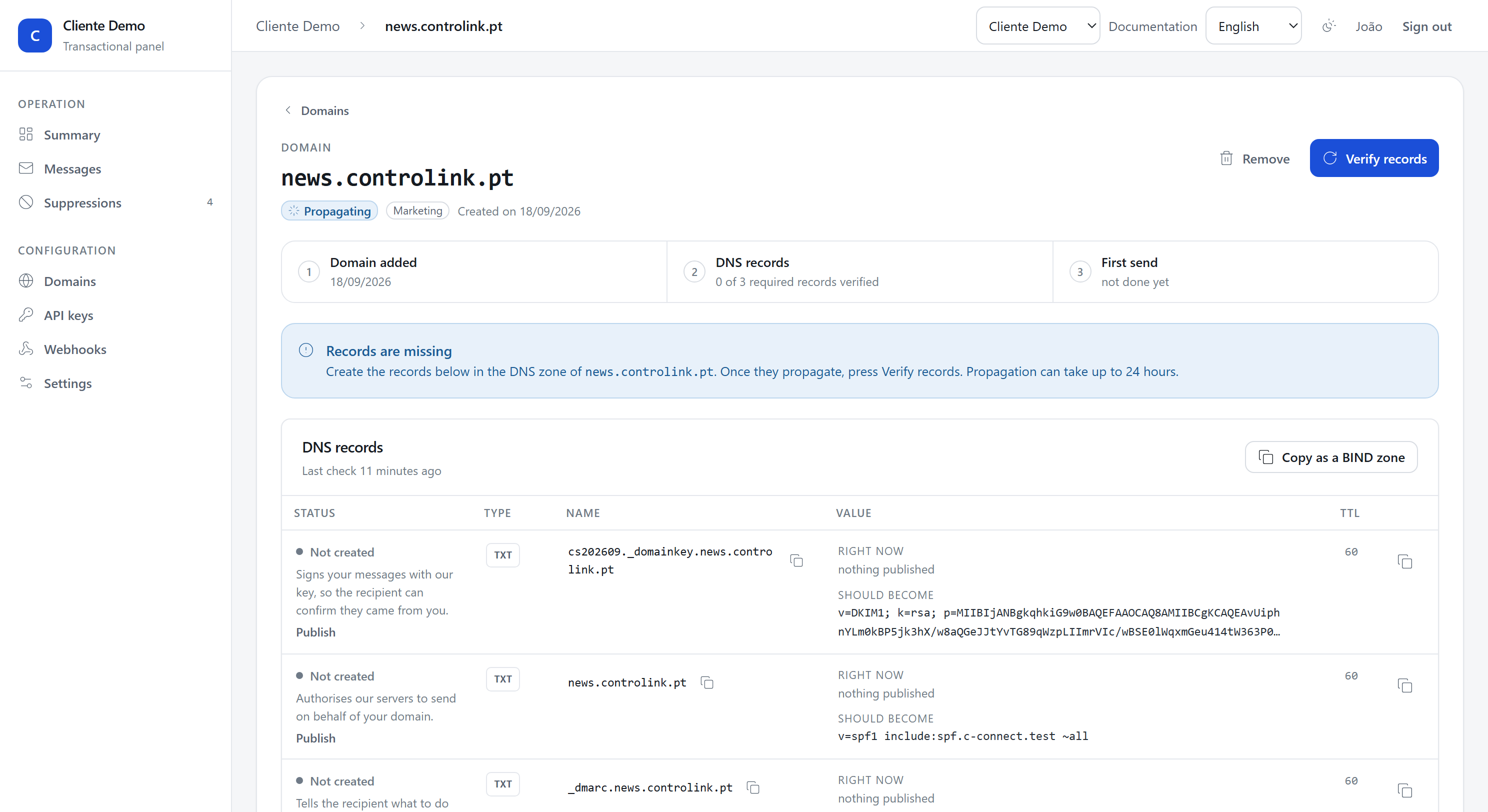
The DNS records, one by one
What each record does, why it is needed, and what happens when one is missing.
Five records, three required and two optional. For each of them the panel shows you what is published right now and what it should become; this page explains why.

DKIM
Required. A cryptographic signature on every message. The recipient reads the public key from your DNS, checks the signature, and knows the message came from who it says and that nobody changed it on the way.
By default we hold the key for you, and what you publish are two CNAMEs:
Name:  cs1._domainkey.mail.mycompany.com
Type:  CNAME
Value: 01j8y3tfc1z9q6d4m2n5p7r8s3-1.dkim.c-connect.pt

Name:  cs2._domainkey.mail.mycompany.com
Type:  CNAME
Value: 01j8y3tfc1z9q6d4m2n5p7r8s3-2.dkim.c-connect.pt
Publish both, once, and never touch them again. Only one of the two signs at a time; the other is where the next key goes when it is time to change it, which we do on our own, on a schedule, without asking you for anything. See Rotating the DKIM key.
Some DNS providers will not answer a query that has to follow a CNAME to reach a TXT record. If yours is one of them, the panel offers Publish the key directly: you publish the key itself as a TXT record instead of the two CNAMEs, and everything above still works, it just asks you for one record each time the key changes.
Without DKIM most large receivers deliver to the spam folder or refuse outright. Gmail and Outlook require it from anybody sending volume.
SPF
Required. It says which servers are allowed to send on behalf of your domain.
Name:  mail.mycompany.com
Type:  TXT
Value: v=spf1 include:spf.c-connect.pt ~all
There is one rule that catches everybody: a domain may have only one SPF
record. If you already have one, do not publish a second. The panel detects
that and shows you the merged record, with our include added to what you
already had. Publish that one, replacing the old.
Two SPF records are not "more permissive": receivers treat that as permerror
and ignore both, which is worse than having none.
There is a second limit: SPF allows ten DNS lookups per evaluation, and each
include counts. If your record already names several providers, the panel
warns you when ours pushes it over the limit.
DMARC
Required. It tells the recipient what to do with a message that fails authentication, and where to send the reports.
Name:  _dmarc.mail.mycompany.com
Type:  TXT
Value: v=DMARC1; p=none; rua=mailto:dmarc@dmarc.c-connect.pt
p=none says "do nothing special, but tell me". It is where everybody starts:
over the first few weeks you find out who is sending with your domain in the
From, which includes forwarders, old providers and, sometimes, somebody
pretending to be you.
Those reports come to us and show up in the panel, in the Who sends as this
domain card. Once everything there is yours and aligned, move to
p=quarantine and then to p=reject.
Return-Path
Optional, and worth it. It aligns the bounce address with your domain.
Name:  bounces.mail.mycompany.com
Type:  CNAME
Value: bounce.c-connect.pt
Without it, bounces come back to bounce.c-connect.pt, which is ours. That
works, but the envelope SPF then points at us rather than at you, and some
receivers look at that alignment. With the CNAME published the envelope becomes
{ulid}@bounces.mail.mycompany.com and the alignment is complete.
Google Postmaster Tools
Informational, not required. This record plays no part in verification: a domain without it verifies and sends exactly as it did before this record existed.
Name:  mail.mycompany.com
Type:  TXT
Value: google-site-verification=<token Google gives you>
It gives our account access to your domain's reputation data in Google Postmaster Tools, spam-complaint rate included. We sign your messages with your domain, not with ours, so it is your domain that has to be verified there for anybody to see those numbers; without this record we still only see our own.
The token comes from Google, per domain, and you set it yourself, from the panel on the domain's page or through the API:
curl -X PATCH https://app.c-connect.pt/v1/domains/{id}/postmaster-verification \
  -H "Authorization: Bearer $CCONNECT_KEY" \
  -H "Content-Type: application/json" \
  -d '{"token": "the-token-google-gave-you"}'
To remove it, send an empty token, {"token": ""}; leaving it out of the
request clears nothing, that fails on purpose, so nobody clears it by
accident. In the panel it is the same gesture, clear the field and save.
What happens while one is missing
While a required record does not resolve, the domain stays unverified and cannot send. That is not a product decision: sending without DKIM from a new domain burns the IP's reputation within hours, and that reputation is shared.
We check every six hours on our own, and you can force a check with Verify records. If a record stops answering later, the panel says so.