Reading the event log
Where to look when somebody says they did not receive it, in the panel and over the API.
The question that reaches support is nearly always the same: "the customer says they did not get it". This page is how that is answered in two minutes.
In the panel
Open Messages and search for the address. The search also takes the subject and the Message-ID.
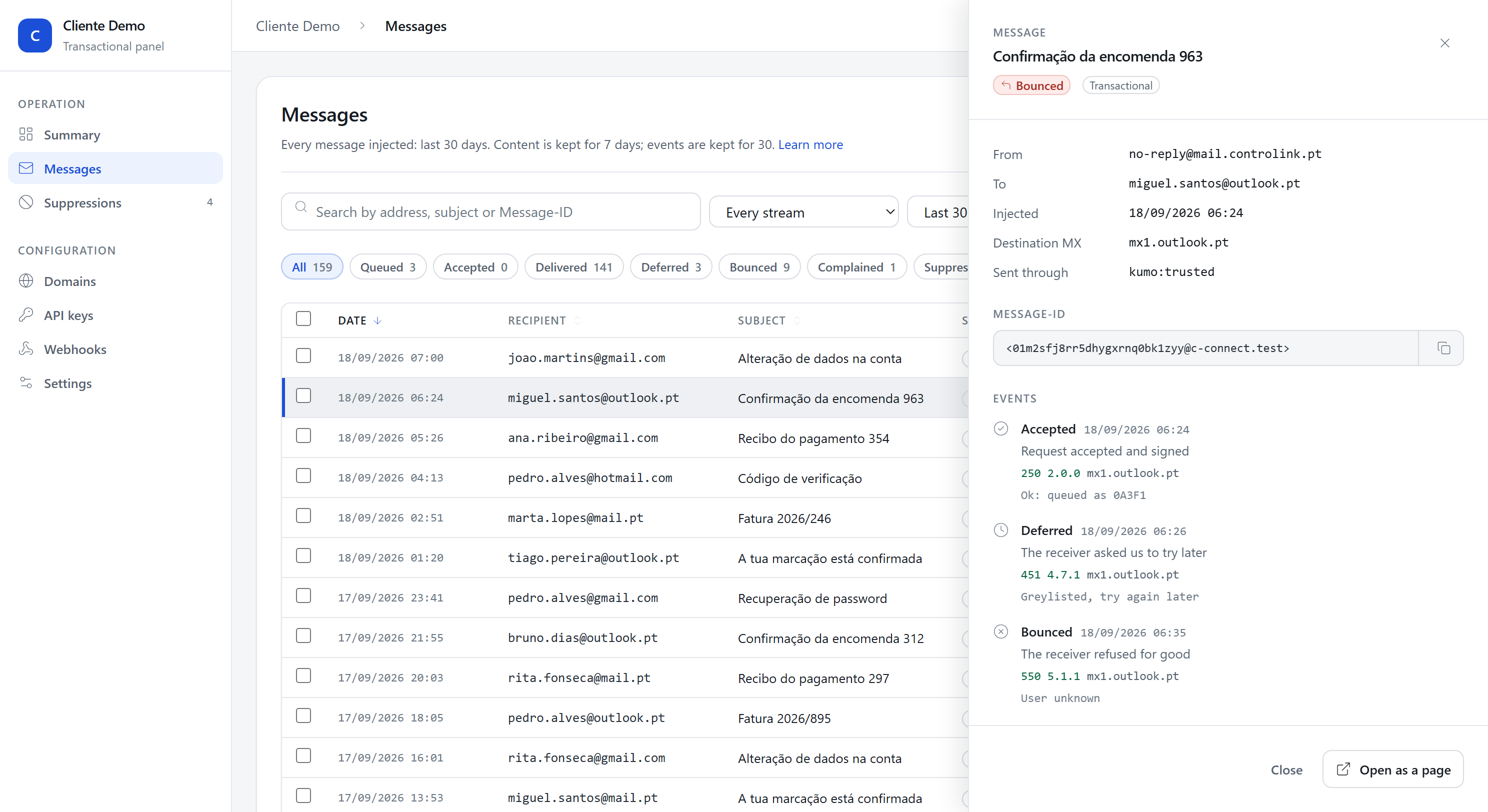
The row carries the state. Click it and the drawer opens, with the full timeline:
- Injected, with the time in your account's zone.
- Destination MX, the server that accepted or refused it.
- Sent through, which relay carried it.
- Every event, with the SMTP code and the receiver's answer, as it came.
The Message-ID is there with a copy button. It is the value the recipient's own support asks for when they have to look on their side.

What the SMTP code says
The receiver's answer is the only first hand information there is about what happened. It is worth reading before concluding anything.
| Answer | What it means |
|---|---|
250 OK |
Accepted. |
550 5.1.1 User unknown |
The address does not exist. |
550 5.7.1 ... spam |
Refused on content or on reputation. |
452 4.2.2 Mailbox full |
Full mailbox; temporary, we try again. |
421 4.7.0 Too many connections |
We are sending to them too fast; temporary. |
A 5.7.x is the one that deserves attention: it is the receiver saying it does
not like the message or whoever sent it, and retrying does not help.
Over the API
One message, with everything that happened to it:
curl https://app.c-connect.pt/v1/messages/01JB2XK7Q9R3N8Z6T4V0M5W1YC \
  -H "Authorization: Bearer $CCONNECT_KEY"
The event stream, newest first:
curl "https://app.c-connect.pt/v1/events?limit=100" \
  -H "Authorization: Bearer $CCONNECT_KEY"
You can filter by message_id and by type.
Paging is by cursor
The answer carries a next_cursor, and the next page is asked for with
?cursor=<that value>.
There is no page and no offset, and that is deliberate. While you walk
through the pages new events arrive, and an offset then points somewhere else:
you would end up with repeated rows and with rows you never saw, and no way to
notice. The cursor walks backwards from an identifier, so nothing appears twice.
GET /v1/events?limit=100
  → { "data": [...], "next_cursor": "01JB2X..." }

GET /v1/events?limit=100&cursor=01JB2X...
  → { "data": [...], "next_cursor": null }     ← the end
How long things are kept
- Events are kept for 30 days.
- The message content is kept for the number of days set in Settings, and then deleted. The row and the timeline stay; the body goes.
- The message row stays.
The content deadline is stamped on each message when it is created, so changing the setting neither deletes anything you have already sent nor extends what was already marked to go.
When the message is not there
If you search and find nothing, the message never came in. Look at your side: a
4xx from the API that nobody handled, a revoked key, or a system still
pointing at the previous provider.