How suppressions work
Why an address stops receiving, which lists exist, and what reactivating actually does.
A suppression is an address we stop sending to. The request is refused before
anything goes out, with 422, and it does not count against your quota.
Two lists, and only one is yours
The account list. Addresses suppressed for you, and only for you. They land there automatically when a message bounces for good, or by hand, by you. You can take anything off it.
The platform list. Addresses suppressed for every client. Only permanent bounces and spam complaints reach it, and you cannot take them off.
The second exists because IP reputation is shared. An address that does not exist still does not exist for the next client, and every attempt costs reputation to everybody sending over that IP. Letting one client spend that reputation is not their decision to make.
In the panel, a row blocked platform wide says Blocked platform wide rather than offering a button that would do nothing.
Why they land there
| Reason | Where it comes from | Which list |
|---|---|---|
| Hard bounce | The receiver refused for good | Account and platform |
| Complaint | The person marked it as spam | Account and platform |
| Unsubscribed | The recipient pressed unsubscribe | Account |
| Manual | You, in the panel or over the API | Account |
The first two are reported by third parties, which is why the API does not let you write them: a bounce you invented yourself would go into the record used to judge your own sending.
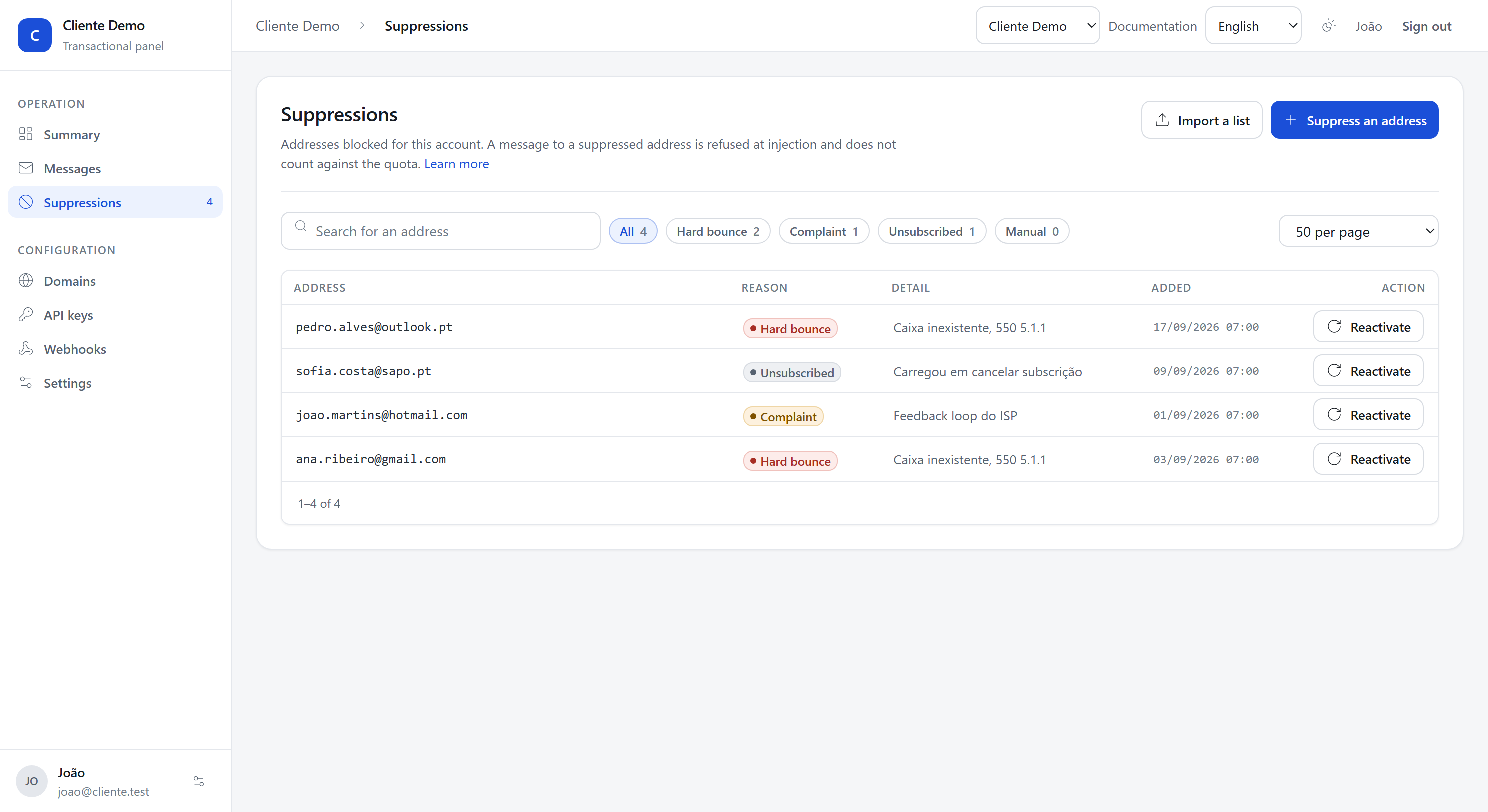
Suppressing by hand
In the panel, under Suppressions, the Suppress an address button. Or:
curl -X POST https://app.c-connect.pt/v1/suppressions \
  -H "Authorization: Bearer $CCONNECT_KEY" \
  -H "Content-Type: application/json" \
  -d '{
    "address": "somebody@example.org",
    "reason": "unsubscribe",
    "detail": "Asked over the phone"
  }'
The reasons you can write are manual and unsubscribe.
What reactivating does
It takes the address off your list, and nothing else.
If it is also on the platform list, it stays blocked, and the answer says so:
still_globally_suppressed: true. That is not a failed request, it is the other
list holding.
It is worth thinking twice before reactivating a hard bounce. The address was suppressed because the receiver said it does not exist; the next message bounces again, and the bounce counts against you.
Reactivating makes sense when:
- the person changed jobs and the mailbox exists again;
- there was a temporary problem misclassified as permanent, which is rare;
- you suppressed it by hand by mistake.
What you should do on your side
A suppression here does not clean your own database. When an address bounces, mark it in your system too:
- so you do not try again through another channel;
- so you do not pay for a contact that does not exist;
- so whoever opens that record understands why there are no emails on it.
If you would rather not poll for them one by one, the bounced and complained
events arrive over webhooks the moment they happen.